AVIF is Superior - And Here's Why
What is AVIF?
AV1 Image Format, or the AVIF, is an image format introuduced in 2019 by Alliance for Open Media, or the AOMedia Group, is the latest image compression technology. Instead of being a standalone image format, it actually takes a single AV1 video frame, and saves it as an image. Unlike older codecs, AV1 utilizes flexible partitioning, which will break frames into 128x128 suberblock that can split into even tinier 4x4 blocks to optimize for areas with varying detail.
For example, a completely black area can be saved as 128x128 to one color pixel, as it uses mostly black. But for high color and brightness changing spots, it goes back to 4x4 to encode seperately. It also uses predictions to guess what the next pixel might be, using directional motion, referencing up to 6 frames. But this is just AVIF, so it doesn’t utilize that, unless it is saved as a GIF-style moving picture. Plus instead of wasting data compressing random, noisy, or grainy video textures, AV1 can strip the grain, send it as metadata, and regenerate it artificially at the decoder.
Often times, it can scale down a huge, 2039.9 KB (2.03 MB) image, down to just 97.8 KB! That’s a whopping 95% compression, and it’s barely lossy, meaning there are barely any grainy or blurry images with sharp details. We can see this being utilized in this Minecraft screenshot, taken of a 1920x1080 frame that was cropped down to 1264x843 (4:3), then its losslessness is lost (no pun intended). Here’s the end result:
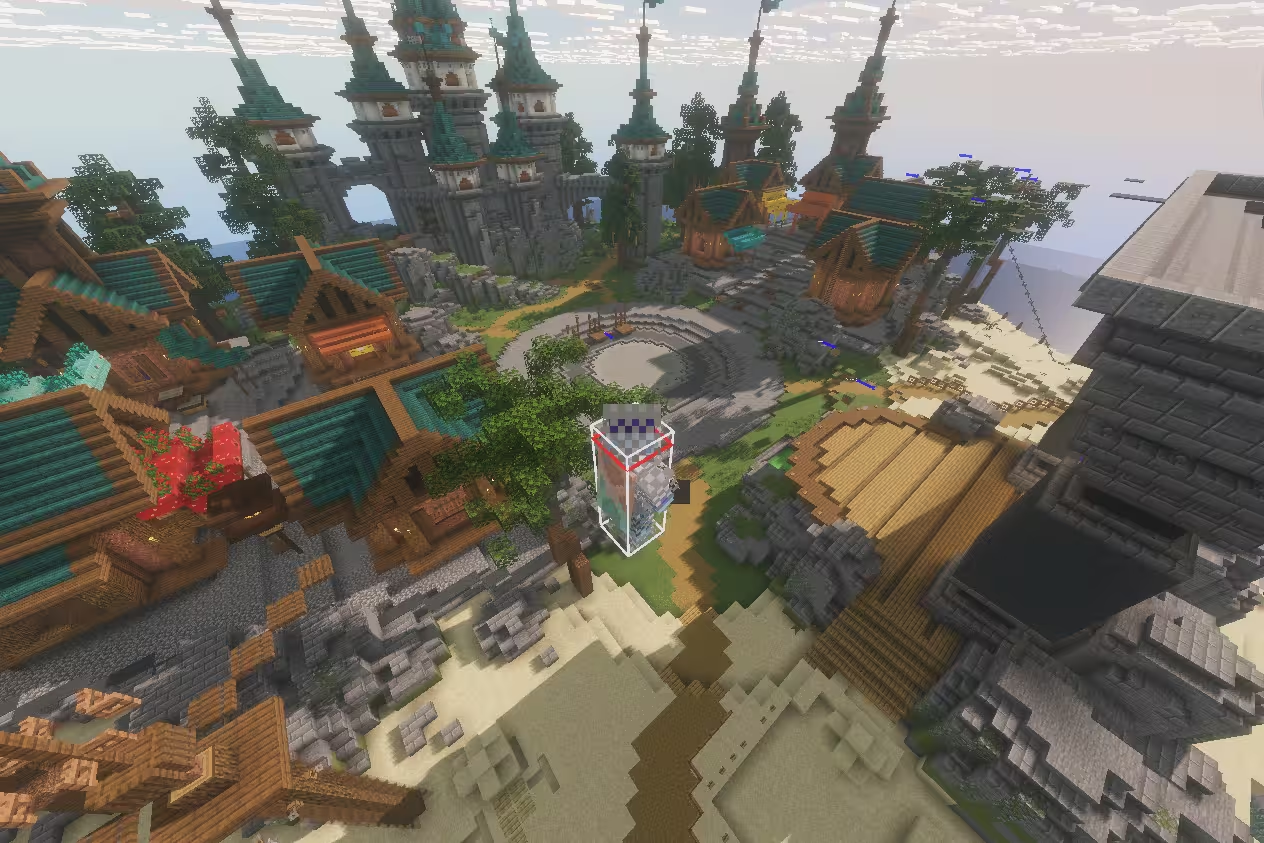
It is barely grainy and hard to see pixel loss. You won’t see any in, say the sky, but some is visible in the leaves.
How Much Better?
If we compare AVIF images to PNGs, we can truly see the difference in file storage we can save.

This comparison of the above example image’s original PNG to its AVIF form shows how much storage we can save we can reduce. As you can see, that’s an entire 95% decrease! I limit 10MB per upload, and that means 5 images of the original PNG version, or around 20 of the AVIF form. Since I am limited to 1 GB storage a month, as that is the limit for free tier CloudFlare Workers KV before I archive it and remove nonimportant posts, I can post a lot more content per post thanks to this amazing technology.
But It Won’t Support!
Well actually, AVIF is supported on all global audience browsers, as you can see from this compatability chart.
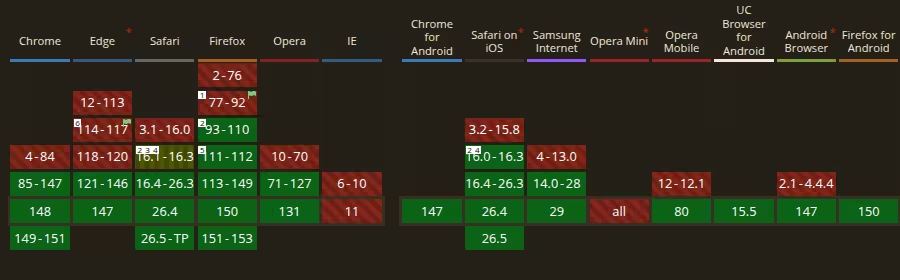
All non-legacy browsers support it. While the image shows no support for Opera Mini, this is back in 2024 and is actually supported now. It supported Edge going back to 2023, Chrome starting 2020, Safari starting 2022, FireFox starting 2020, Samsung Internet starting 2021, Opera starting 2020, Opera for Mobile starting 2024, and KaiOS browser starting 2025. Falkon also supports, and so does QQ Browser and Baidu.
The only browsers not supporting is one, and that one is Internet Explorer. This makes sense, as the last version was released in 2013, 6 years before the release of AVIF. While exporting may take a few more seconds, it’s only one frame, and it decodes extremely fast even on low end phones or Chromebooks, often with no wait time to finish. It is a highly versatile option for archiving or daily using images.
When to Not Use
While AVIF is a great lossy compression technique, there are instances when AVIF is not needed, such as extremely small images or pixel art, or any image that has to be guaranteed lossless. This is when PNG comes into play, but it is outside AVIF’s intent. AVIF is intended to replace WebP and JPG/JPEG (same thing), and GIF, and it still beats early versions of JPG XL.
Favicons are also out of luck, as while it can properly index AVIF files, support for using it as favicons is still yet to arrive. For now, use PNG for favicons, and SVG for scalable when you can, as SVG is more efficient and scales properly. Use PNG only for pixel art favicons (like my website).
More: AV1 vs HEVC (H.265)
Now all image format technologies are royalty free, including the video compression LZW in .GIF same cannot be said for videos in H.264 and the newer H.265 which still have and have licensing fees. AV1 is designed to be fully royalty free, while HEVC (H.265) users will have to pay a small fee. Which is like, come on. I get that it takes skill and lots of time to create an advanced compression technology, but why would users still have to pay this fee? I’m not sure if it is Microsoft or Access Advance, but please just make it free. Come on, it makes the Windows Media Player look awful. MacOS and ChromeOS doesn’t have this because the OS itself is free*.
*MacOS and ChromeOS is proprietary but doesn’t charge an aditional fee. Hardware licensing is payed by Apple, and Chromebooks are payed by the GPU manufacturer. ChromeOS Flex is free, so doesn’t apply. Same for Linux, ReactOS, and FreeBSD.
Conclusion
It’s simple. USE IT!